Onboarding Home Assistant
Getting Started
Alright, you made it here. The tough part is done.
Splitting up the configuration
Docs / Configuration
Alright, so we’ve got the single integrations and the include statements in the base ...
Template Light
Integration
Template Light
Blog / 2022.6: Gaining new insights
#ReleaseNotes
JUNE 1, 2022 by Franck Nijhof
While many of you enjoy a
well-deserved
vacation around this time, it seems like it didn’t slow down the development/contributions made to
Home Assistant. What a beautifully packed release this is again!
I’m super stoked about the added Bluetooth support, opening up a whole new world of devices to Home
Assistant. I’m even more excited about the new repairs and supported brands features. Those are
going to help out A LOT 😃.
Do you know what is really great about this release? All the major features and changes announced in
this release are a step forward to our current goal: Streamlining experiences.
Enjoy the release!
A completely new feature we
hope you are going to love: Repairs! 👷♂️
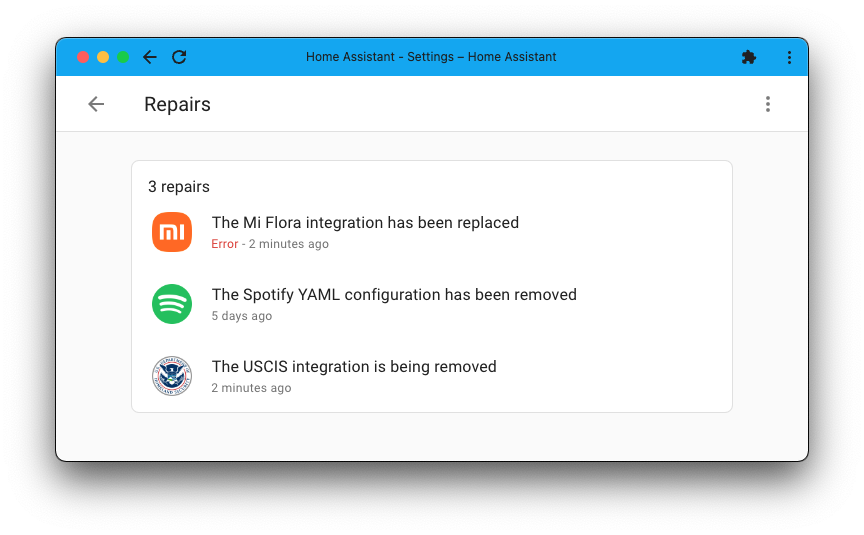
The repairs dashboard can be found in the settings menu and is a place where Home Assistant can
notify you of issues that you can (and should) fix!
From detected current issues on your system to future issues, e.g., caused by the use of a feature
that will be removed, and anything in between. The problems reported by the repair dashboard are
actionable and resolvable by you.
D
3 Aug
Jhone Doe
Great Summer released😊
Thanks for this awesome work!
H
3 Aug
darathor
Excellent work! thanks!
I'll try out the Bluethooth support with Eve devices!
3 Aug
Viking
I've added the Google integration and I can see all my HA devices (entities) in Google Home on my Android phone. But I have other 3rd party integration in Google Home that's not compatible with Home Assistant. Now, since these devices are visible in Google home, is there a way to make them visible in Home Assistant throught the Google integration in some way?
1 replyShare this post